SGF Zero-Export Solar System (SGF ZESS)
Customer Notification & Registration Process Guide
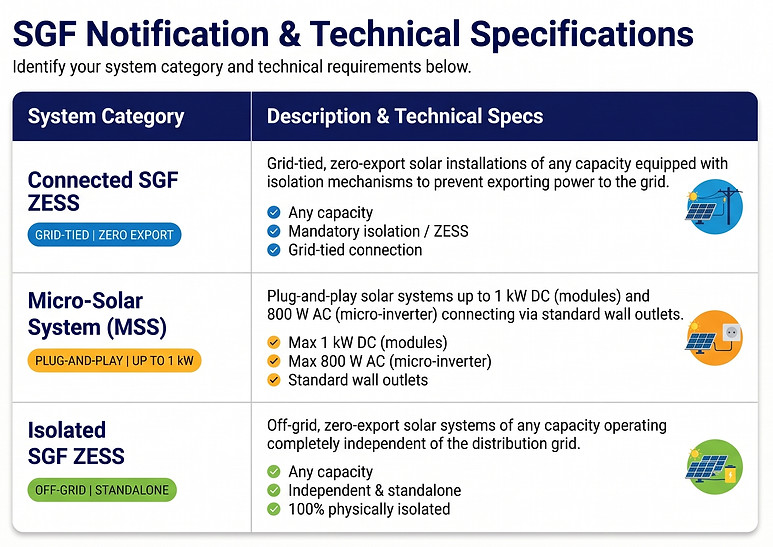
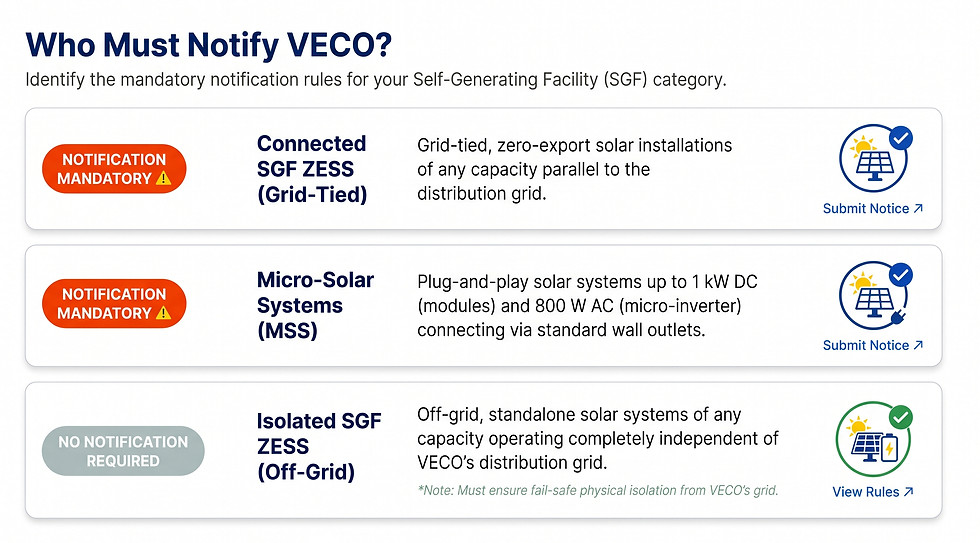
Under Department of Energy Circular DOE DC 2026-08-0017, customers within the Visayan Electric franchise area may install and operate a Self-Generating Facility Zero-Export Solar System (SGF ZESS) for on-site electricity generation.
Submitting your official notice ensures your system is properly registered, compliant with grid safety requirements, and verified to prevent reverse power flow into the local distribution network
Step-by-Step Notification Guide
-
Download & Complete the Annex "A" Form
Download the official Annex "A" SGF ZESS Notification Form. Fill out your complete end-user profile, technical solar PV ratings, inverter specifications, and qualified installer details.
-
Access the Customer Portal
Open the Visayan Electric Request Portal (requests.visayanelectric.com) on your desktop or mobile browser.
-
Provide Your Contact Information
Enter your active Email Address and Full Name so our engineering team can send your confirmation receipt and reference tracking number.
-
Format Your Subject Line
In the Subject field, enter the required naming format:
[Your 10-Digit Account ID] _SGF ZESS NOTIFICATION
(Example: 1234567890_SGF ZESS NOTIFICATION)
-
Select Request Type
From the Type of Request dropdown menu, select "Others".
-
Provide System & Technical Details
In the Description box, provide the following key details:
-
Installed Solar PV Capacity (kWp) & Inverter Make/Model
-
Reverse-power protection / zero-export limiter model
-
Name of Accredited Solar Contractor / Professional Electrical Engineer (PEE)
-
Primary Contact Person & Mobile Number
-
-
Acknowledge Data Privacy
Review and tick the mandatory Data Privacy Statement checkbox to authorize document handling in accordance with the Data Privacy Act of 2012.
-
Attach Documents & Submit
Upload the following mandatory requirements (PDF or JPEG format, max 10MB per file):
-
Signed and completed Annex "A" Notification Form
-
Clear, high-resolution photo of your existing Visayan Electric Revenue Meter (showing the meter serial number and current register)
-
Optional: Single-Line Diagram (SLD) and Zero-Export Limiter specification sheet
Click "Submit" to log your application.
-
What Happens Next?
-
Application Log & Reference ID: You will receive an immediate automated email containing your unique Ticket Number.
-
Document & Engineering Review: Visayan Electric technical engineers will assess the submitted zero-export scheme within 3 to 5 working days.
-
Site Verification (If Applicable): If physical inspection or zero-backfeed witness testing is necessary, a customer service representative will contact your designated engineer to schedule a visit.
-
Future Net-Metering Upgrade: If you decide to transition from zero export to selling excess energy back to the grid in the future, your registered profile will help expedite your transition to the Visayan Electric Net-Metering Program.
-
Download & Complete the Annex "A" Form
Download the official Annex "A" SGF ZESS Notification Form from the downloads section below. Fill out your complete end-user profile, technical solar PV ratings, inverter specifications, and qualified installer details.
-
Access the Customer Portal
Open the Visayan Electric Request Portal (requests.visayanelectric.com) on your desktop or mobile browser.
-
Provide Your Contact Information
Enter your active Email Address and Full Name so our engineering team can send your confirmation receipt and reference tracking number.
-
Format Your Subject Line
In the Subject field, enter the required naming format:
[Your 10-Digit Account ID] _SGF ZESS NOTIFICATION
(Example: 1234567890_SGF ZESS NOTIFICATION)
-
Select Request Type
From the Type of Request dropdown menu, select "Others".
-
Provide System & Technical Details
In the Description box, provide the following key details:
-
Installed Solar PV Capacity (kWp) & Inverter Make/Model
-
Reverse-power protection / zero-export limiter model
-
Name of Accredited Solar Contractor / Professional Electrical Engineer (PEE)
-
Primary Contact Person & Mobile Number
-
-
Acknowledge Data Privacy
Review and tick the mandatory Data Privacy Statement checkbox to authorize document handling in accordance with the Data Privacy Act of 2012.
-
Attach Documents & Submit
Upload the following mandatory requirements (PDF or JPEG format, max 10MB per file):
-
Signed and completed Annex "A" Notification Form
-
Clear, high-resolution photo of your existing Visayan Electric Revenue Meter (showing the meter serial number and current register)
-
Optional: Single-Line Diagram (SLD) and Zero-Export Limiter specification sheet
Click "Submit" to log your application.
-
Step-by-Step Notification Guide
-
Application Log & Reference ID: You will receive an immediate automated email containing your unique Ticket Number.
-
Document & Engineering Review: Visayan Electric technical engineers will assess the submitted zero-export scheme within 3 to 5 working days.
-
Site Verification (If Applicable): If physical inspection or zero-backfeed witness testing is necessary, a customer service representative will contact your designated engineer to schedule a visit.
-
Future Net-Metering Upgrade: If you decide to transition from zero export to selling excess energy back to the grid in the future, your registered profile will help expedite your transition to the Visayan Electric Net-Metering Program.
What Happens Next?
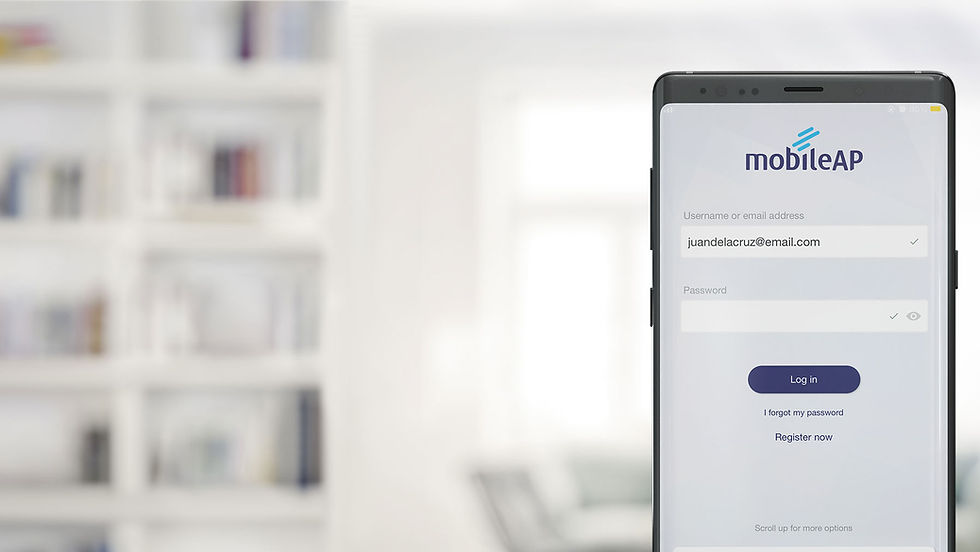
View Your Electricity Bill Anytime, Anywhere with MobileAP
Aside from allowing customers to check their monthly electricity bill, MobileAP allows them to view their payment history for the past 12 months, see consumption charts to help monitor energy consumption, register multiple Visayan Electric accounts, and check the list of payment options.